装着 AI 维护员
的 U 盘A USB drive with an AI technician inside
插到哪台电脑,PicoClaw 智能体就在哪台电脑上读取真实状态、调用维护工具、用大白话讲清结果;要动手之前一定先问你。对话、报告、设置都存在你的 U 盘里,拔下就带走。Plug it into any computer and the PicoClaw agent reads that machine's real state, calls maintenance tools and explains the result in plain words — and it always asks before it changes anything. Conversations, reports and settings live on your drive and leave with it.
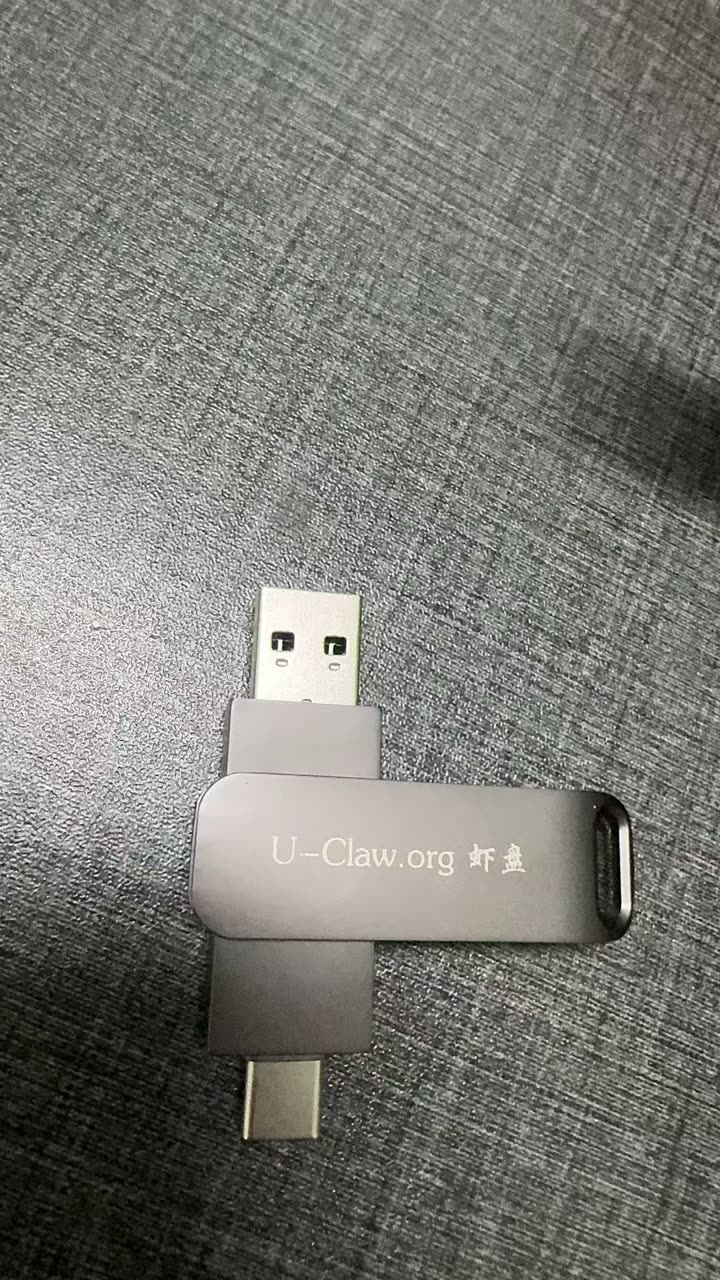 ● 实拍Real photo
先查再说,等你点头Check first, explain, then wait for your OK
开头为手机实拍;Agent 段是 2026-10-02 的真实云端调用录屏,工具与设置段是 2026-10-03 从闪迪 U 盘运行的实时录屏。剪去的等待时间都在画面上标注。Opening shots are real phone footage. The agent segment is a real cloud-backed recording from 2 Oct 2026; tools and settings were recorded live from a SanDisk USB drive on 3 Oct. Every cut wait is labelled on screen.
视频 55 秒 · 1080p · 中文配音与字幕 · 配音为 AI 合成,背景音乐为纯音乐。55 s · 1080p · Chinese narration and subtitles · AI voice, instrumental music. 下载视频Download video
小、快、随身,而且你说了算Small, fast, portable — and you stay in charge
修电脑最难的不是修,是不知道从哪下手:该用哪个工具、结果怎么看、换台电脑又要重新装一遍。虾盘把判断交给随身的 Agent。The hard part of fixing a PC is knowing where to start: which tool, how to read the result, and setting everything up again on the next machine. Xiapan hands that judgement to an agent you carry.
极小体积Tiny
主程序 8.4 MB;连 PicoClaw 智能体在内,Windows 压缩包 16.9 MB。不带模型也能用。8.4 MB program; 16.9 MB zip for Windows including the PicoClaw agent. Useful without any model.
启动极快Instant
双击后本机服务 0.28 秒就绪(闪迪 U 盘实测),无需安装 Node.js、Python 或任何运行库。Local service ready in 0.28 s from a SanDisk drive. No Node.js, Python or runtime to install.
真 Agent,不是聊天框A real agent, not a chat box
读取这台电脑的真实内存、磁盘、网卡和驱动,依据工具结果回答,再申请下一步。Reads this machine's real memory, disks, adapters and drivers, answers from tool results, then proposes the next step.
动手前一定先问Always asks first
保存报告、打开工具都要你在页面确认;禁用任意 shell,模型无法绕过确认。Saving a report or opening a tool needs your click. No arbitrary shell; the model cannot bypass confirmation.
断网也不慌Works offline
网卡、硬件 ID、驱动版本和故障码在本地就能查,不用模型、不花额度。Adapters, hardware IDs, driver versions and error codes are checked locally — no model, no credits.
模型随你选Your choice of model
虾盘云(免账号设备钱包)、自带 OpenAI 兼容 API(密钥不回显),或可选离线小模型。Xiapan Cloud (account-free device wallet), your own OpenAI-compatible API (key never echoed), or an optional offline model.
记录跟着 U 盘走Your records travel
对话、报告、设置、钱包都在盘里;拷到另一块盘,对话照样接得上(已实测)。Chats, reports, settings and wallet stay on the drive; copy them to another drive and the conversation continues (tested).
35 项维护工具35-entry toolbox
可搜索分类;6 款便携软件随盘内置,打开前校验 SHA-256,其余给出官方入口。Searchable by purpose; 6 portable utilities bundled and checksum-verified before launch, the rest link to official sources.
中英双语Chinese & English
界面一键切换中英文,选择存在 U 盘上,AI 也用同一种语言回答。Switch the whole interface between Chinese and English; the choice is saved on the drive and the AI answers in it too.
一个动作核心,界面、命令行和 Agent 共用One action core shared by the UI, the CLI and the agent
Go 主程序在 U 盘目录内启动本机浏览器界面;PicoClaw 随盘运行,经临时本机 MCP 接口调用白名单维护动作。设置、对话和报告原子写入盘内 data/。A Go program starts a local browser UI from the drive. PicoClaw runs from the drive and reaches an allow-listed set of maintenance actions through a temporary local MCP endpoint. Settings, chats and reports are written atomically to data/ on the drive.
你说出问题You describe it
“帮我体检内存和磁盘,再保存一份报告。”“Check my memory and disks, then save a report.”
读取真实状态Real readings
system.inspect · drivers.inspect · startup.inspect · tools.catalog
讲清楚,再申请Explain, then ask
写入或打开程序前,页面出现“等待你确认”。Before writing or launching anything, the page shows “waiting for your confirmation”.
执行并记录Run and record
确认后才执行,结果回到同一段对话,报告写进 U 盘。Runs only after you confirm; the result returns to the same chat and the report is saved on the drive.
哪些已经能用,哪些还在路上What works today, what is next
| 平台Platform | 状态Status | 说明Notes |
|---|---|---|
| Windows x64 | 实体 U 盘实测Tested on USB | 两块实体 U 盘(exFAT / NTFS)运行;真实虾盘云问答;PicoClaw 工具调用;确认后保存报告;6 款便携工具实际打开。同一台电脑上验证。Two physical drives (exFAT / NTFS); real cloud chats; PicoClaw tool calls; confirmed report saving; six portable utilities launched. Verified on one PC. |
| macOS · Apple Silicon | 贡献者实测Contributor-tested | 虾盘.app 从 exFAT U 盘启动、体检、PicoClaw 对话与离线 AI(M4)已实测;网页下载版需 Developer ID 签名公证,暂请从源码构建或直接写入 U 盘。虾盘.app from an exFAT drive, inspection, PicoClaw chat and offline AI (M4) tested. A downloadable build needs Developer ID signing and notarisation; build from source or write to a drive for now. |
| macOS · Intel / Linux | 核心可构建Core builds | 核心程序可编译;完整打包与实机验收尚未完成。The core compiles; full packages and hardware testing are not done yet. |
已实测Tested
- Agent 读取真实状态 → 解释 → 申请 → 确认后写入报告Agent reads real state → explains → asks → saves the report after confirmation
- E 盘数据拷到 F 盘后,模型选择与完整对话照常接续After copying data from drive E to F, model choice and the full chat continue
- 断网可用的网卡与驱动识别(硬件 ID、驱动版本、故障码)Offline adapter and driver identification (hardware ID, version, error code)
- 自带 API 密钥隔离、每轮临时凭证清理Own-API key isolation and per-turn credential cleanup
深圳要完成Next, in Shenzhen
- 同一块 U 盘换第二台电脑,重新识别后接着修Move the same drive to a second PC and continue the task
- 断网驱动修复闭环:识别 → 匹配有校验的驱动 → 确认 → 复查Offline driver repair loop: identify → match a verified driver → confirm → recheck
- macOS 签名公证包与 Intel / Linux 实机验收Signed macOS package; Intel Mac and Linux hardware testing
- 不做:自动清理、自动重装、未经确认的修改Not doing: automatic cleanup, reinstalls or unconfirmed changes
下载体验包Download
Windows x64 · 0.4.3-preview
⬇ 下载 ZIPDownload ZIP- 解压到 U 盘(exFAT 或 NTFS)或任意文件夹。Unzip to a USB drive (exFAT or NTFS) or any folder.
- 双击根目录的
虾盘.exe,浏览器自动打开。Double-click虾盘.exe; the browser opens. - 本地检测无需模型;要用 AI,在“模型设置”选虾盘云或填你自己的 API。Local checks need no model; for AI, pick Xiapan Cloud or your own API in Model settings.
macOS · 从源码from source
git clone https://github.com/dongsheng123132/xiapan-usb
cd xiapan-usb
python3 scripts/prepare-macos-runtime.py --arch arm64
./scripts/build.sh
python3 scripts/package-macos.py